The Setup
I had a news curation pipeline that produced a clean HTML newspaper every morning, six articles selected by topic relevance, formatted for reading. It worked well, but reading it meant opening a laptop. A personal newspaper should be ambient, something on the wall you glance at like a clock.
The Waveshare 12.48" e-paper panel runs at 1304x984 pixels. Always-on, no backlight, no power draw between refreshes, readable from across the room in any lighting. A full update takes 15–20 seconds and involves an ugly flashing sequence (the display cycles through inversion patterns to prevent ghosting), which rules out anything dynamic. For a dashboard that updates every few minutes, it's fine.
Four Data Sources
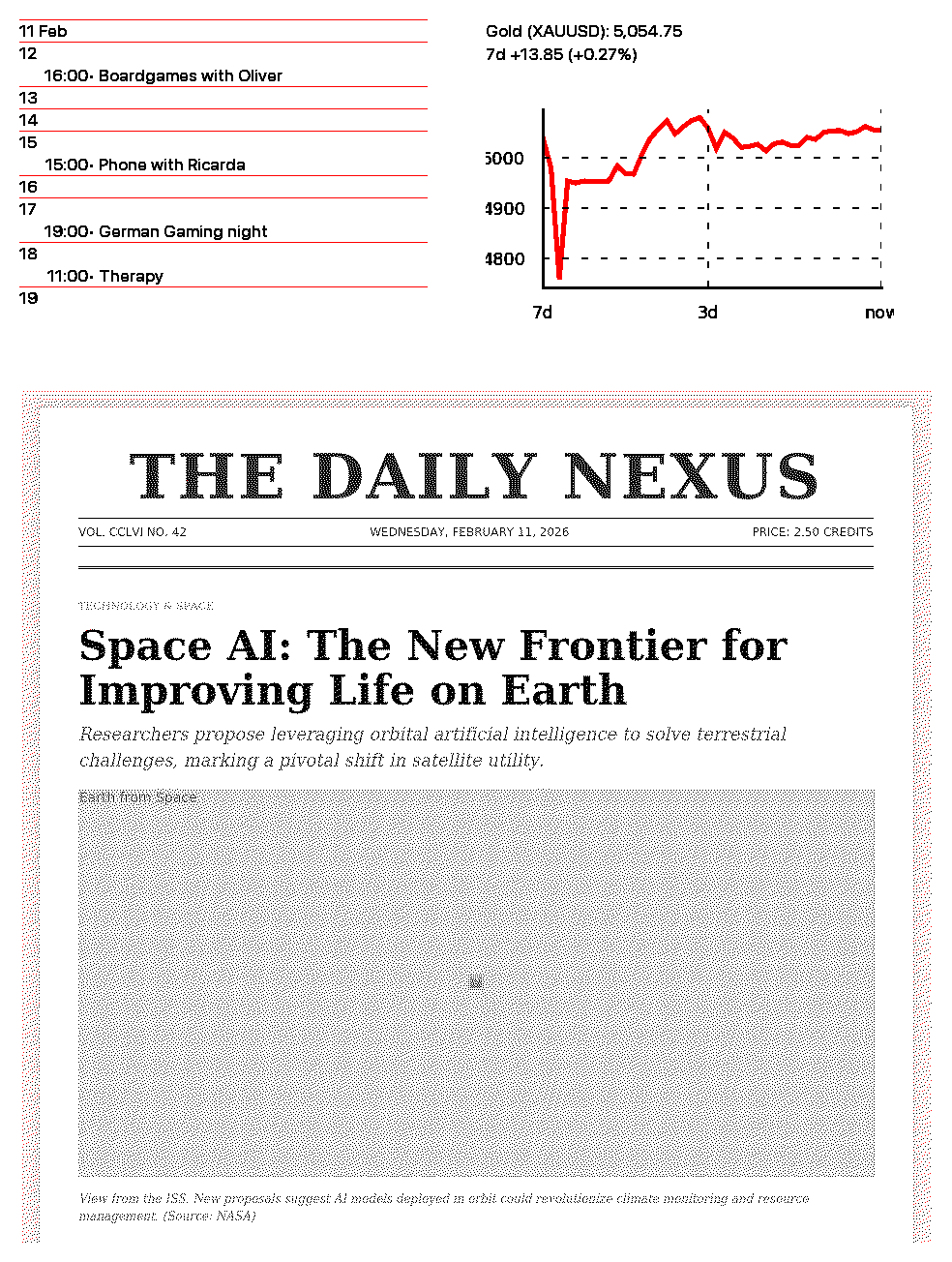
The dashboard pulls together four feeds, each on its own update schedule:
- News (every 24 hours): The full AI curation pipeline, RSS feeds filtered through BGE-M3 embeddings, curated by Ollama running qwen3-next, producing a self-contained HTML page
- Gold price (every hour): Current spot price via yfinance, rendered as a chart
- Google Calendar (every hour): Today's events as a timeline
- Display refresh (every 5 minutes): Renders everything to the e-paper via Inkycal's Webshot module
[scheduler]
news_interval = "24h"
gold_interval = "1h"
calendar_interval = "1h"
display_interval = "5min"
A single scheduler process manages all four tasks. Each runs in sequence when its interval elapses, no threading, no async, just a loop that checks timestamps and fires tasks in priority order. This runs on a Raspberry Pi 2, and I wanted the failure modes to be obvious.
Split Architecture
A Raspberry Pi 2 has 1 GB of RAM and a 900 MHz quad-core ARM CPU running Raspberry Pi OS Bullseye. Loading a sentence embedding model and running an LLM is out of the question on this hardware.
So the heavy computation (RSS collection, embedding, LLM curation) runs on my desktop. The Pi handles display rendering: it receives pre-built HTML via SFTP, renders it to a bitmap using Inkycal's Webshot module, and pushes the bitmap to the e-paper controller. A systemd service keeps the scheduler running across reboots. The whole thing auto-starts on power-up.
Dependency Hell on Bullseye
The most tedious part of the project was dependency management on Bullseye. The older GLIBC means many modern Python packages won't install from PyPI, their pre-built wheels target a newer C library. yfinance was the worst offender: version 0.2.36 and above require GLIBC 2.33, Bullseye has 2.31. I had to pin yfinance to 0.2.35.
Inkycal 2025.12.15 brought its own conflicts: the Webshot module depends on a specific Chromium version for headless rendering, and that Chromium version conflicts with the Pi's default display drivers in certain configurations.
None of this was intellectually interesting. Hours of reading error messages, cross-referencing version matrices, testing on the actual hardware because Docker on ARM doesn't reproduce the exact environment. The kind of work that consumes a disproportionate fraction of actual project time.
What I Learned
Running heavy computation on capable hardware and pushing results to a thin display client is a clean split. The Pi does GPIO and display driving; it doesn't attempt ML inference.
A single-threaded scheduler with timestamp-based intervals is less elegant than async task queues, but it's easier to debug at 11 PM via SSH when the display stops updating. On constrained hardware, debuggability matters more than architecture.
GLIBC version constraints, ARM wheel availability, and package interdependencies make embedded Linux a different world from desktop Python. I spent more time on yfinance version pinning than on the scheduler logic.
The dashboard hangs in my hallway now. News refreshes every morning, gold price updates hourly, calendar shows the day's appointments. I want to add a weather forecast bar along the bottom and maybe a reading queue, articles saved throughout the day, rendered on the e-paper by evening. But mostly I just stop noticing it's there, which for an ambient display is the point.